# Merlin

## URL

[https://merlin.allaboutbirds.org](https://merlin.allaboutbirds.org/)

## Description

Merlin is a bird-identification app with a repository of over [10,000 birds](https://support.ebird.org/en/support/solutions/articles/48000961587-merlin-bird-id-faqs) in its system. This app can enable open source researchers to analyze and discover the location where an audio, photo or video featuring a bird may have been taken.

It has three identification methods:

1. Step by step

Enter characteristics such as the color of the bird and size to find your bird. Merlin offers numerous options depending on location and date. You will get a description of each bird found matching the search terms, sounds and geographic expansion of the birds.

<div align="left"><figure><img src="/files/BNEQUB43S9qQQlkr6gVs" alt="" width="208"><figcaption><p>Here is an example of how to use this option looking for a Lesser kiskadee in a city in Colombia.</p></figcaption></figure></div>

2. Sound ID

You can record birds and Merlin will match them with birds near you based on your location. The sounds you upload are saved in the app with location and time information. The recognition system is good enough to detect the sound of birds even with a little background noise. They have [2066 bird species sounds](https://ebird.org/region/AU-WA-WAN/post/merlin-sound-id-is-coming-to-australia)!

3. Photo ID

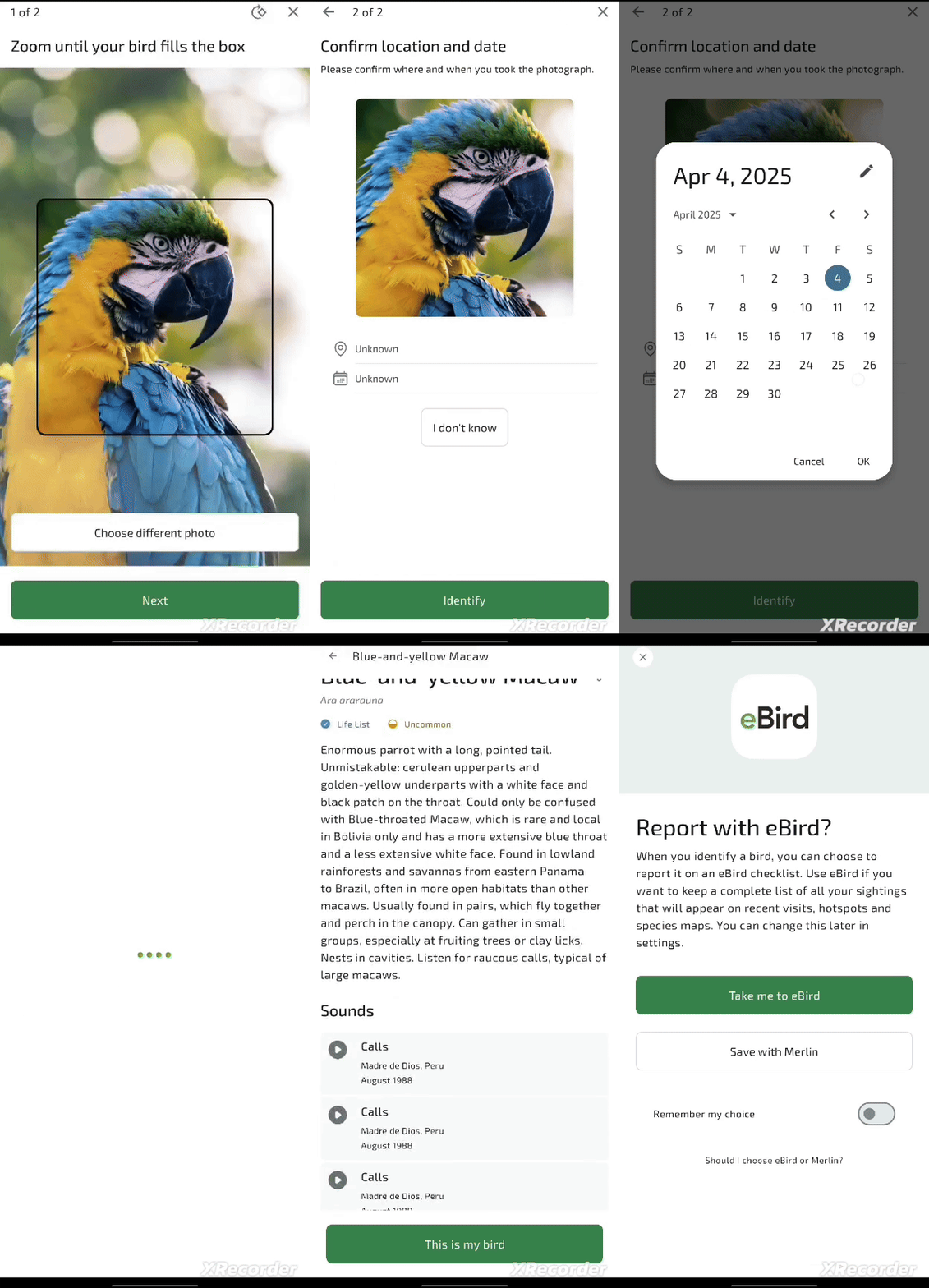
You can take a photo of your bird of interest or upload an existing one from your gallery. You can also optionally add location and date information. The app will match the image with species in the database.

<div align="left"><figure><img src="/files/nN6qsOCkoM1Zze1WFP5Z" alt="" width="208"><figcaption><p>An example of this option looking for a blue and yellow macaw in Colombia.</p></figcaption></figure></div>

For a successful identification, be sure to enter as many characteristics as you can. This way the system can provide more specific results. In testing the app, 8 out of 10 times the system returned the bird I was looking for. The app gives many options and can be confusing if searching for a bird with similar colors and characteristics to others.

For example, if you search for a medium-sized black bird that was seen flying, the system will return a lot of black birds in your area, and there may be too many to recognize yours. But if you also add red in the system because you saw that the bird's eyes were that color, the app will give you more particular results (in my case, I got as second choice the bronzed cowbird and this was my bird!).

It is not necessary to create an account to use the application. However, one of the advantages of creating one is that you can create lists of the birds you search for and save them. In addition, Merlin allows [data packets ](https://support.ebird.org/en/support/solutions/articles/48000966223-my-offline-birds?__hstc=75100365.51452a210e378915111e1d498b0f7aab.1742251458388.1747844962673.1748267627622.6&__hssc=75100365.6.1748267627622&__hsfp=4052119064&_gl=1*xlayd4*_gcl_au*MTE5NzM5MjUxMC4xNzQyMjUxNDU0*_ga*MTk4OTY0NDkzOS4xNzQyMjUxNDU1*_ga_QR4NVXZ8BM*czE3NDgyNjYyMzEkbzckZzEkdDE3NDgyNjgwNTckajYwJGwwJGgwJGR4bzhKSmdmcWRIVzF3dXlQYU9XWHNlY2JZSENWY3Z3c1JR&_ga=2.263960904.513365111.1748267626-1989644939.1742251455)downloads based on the location of interest. For example, you can download a Paraguayan birds packet to get more specific results when searching for birds in this country.

**Similar tools**

There are other apps that help identify birds. There is [eBird](https://ebird.org/explore), an app where you can search photos and sounds, explore birds hotspots and explore various bird statistics in each region. This app has many more features than Merlin and is not as focused on identification as it is on recording birds in lists, which makes it ideal for birding. However, the good news is that Merlin is powered by eBird! This means that, after identifying your bird with Merlin, you can add it to lists in eBird if you wish (although you can also create lists in Merlin).

Other popular bird identification apps feature region-specific information, such as [Birds in Backyards](https://www.birdsinbackyards.net/) for Australia and [Bird Spot](https://www.birdspot.co.uk/british-bird-identifier) for British birds.

## Cost

* [x] Free
* [ ] Partially Free
* [ ] Paid

## Level of difficulty

<table><thead><tr><th data-type="rating" data-max="5"></th></tr></thead><tbody><tr><td>1</td></tr></tbody></table>

## Requirements

Merlin can be [downloaded](https://merlin.allaboutbirds.org/download/) for free on Android and Apple devices.

## Limitations

Keep in mind that the system may not always be successful in identifying birds.

Merlin [only runs](https://support.ebird.org/en/support/solutions/articles/48000966221-install-merlin) on Android devices with Android 6 or newer, iPhones and iPads with iOS 16 or newer, and M1/M2-equipped Apple computers. There is no desktop version or website.

## Ethical Considerations

Wanting to identify birds is not an opportunity to disturb or mistreat them in any way. Check out the [Wisconsin Ornithological Society's Code of Ethics](https://wsobirds.org/about-wso/code-of-ethics).

## Guide

Help Center: <https://support.ebird.org/en/support/solutions/articles/48000966225-merlin-tips-and-tricks>

How to use the Merlin Bird ID App (Photo/Call ID): A Beginner's Guide: <https://www.youtube.com/watch?v=Woe_Q6S8oyw>

Merlin Bird ID Demo from the Cornell Lab of Ornithology: <https://www.youtube.com/watch?v=xmSUOLxyatY>

## Tool provider

Cornell Lab of Ornithology, based on New York.

Contributors: <https://merlin.allaboutbirds.org/the-story/>

## Advertising Trackers

* [x] This tool has not been checked for advertising trackers yet.
* [ ] This tool uses tracking cookies. Use with caution.
* [ ] This tool does not appear to use tracking cookies.

| Page maintainer |
| --------------- |
| Lieth Carrillo  |
|                 |


---

# Agent Instructions: Querying This Documentation

If you need additional information that is not directly available in this page, you can query the documentation dynamically by asking a question.

Perform an HTTP GET request on the current page URL with the `ask` query parameter:

```
GET https://bellingcat.gitbook.io/toolkit/more/all-tools/merlin.md?ask=<question>
```

The question should be specific, self-contained, and written in natural language.
The response will contain a direct answer to the question and relevant excerpts and sources from the documentation.

Use this mechanism when the answer is not explicitly present in the current page, you need clarification or additional context, or you want to retrieve related documentation sections.