> For the complete documentation index, see [llms.txt](https://bellingcat.gitbook.io/toolkit/llms.txt). Markdown versions of documentation pages are available by appending `.md` to page URLs; this page is available as [Markdown](https://bellingcat.gitbook.io/toolkit/more/all-tools/shodan.md).
# Shodan
A search engine for internet-connected devices, from webcams to databases.
## URL
[https://shodan.io/](https://www.shodan.io/)
## Description
Shodan is a search engine that indexes internet-connected devices. Shodan covers devices from servers, routers, webcams, and industrial control systems to [Internet of Things (IoT)](https://www.ibm.com/think/topics/internet-of-things) devices and databases. It allows users to explore what is exposed to the public internet and gather technical information such as IP addresses, open ports, protocols, software versions, and geographic locations.
Researchers can search by keyword, organization, country, network range, or device type, and combine filters (e.g. `country:DE port:21`) to narrow results. Each result links to detailed host information, including banners, metadata, and sometimes screenshots (for example, login interfaces or webcams visible online). Device searches may use a variety of filters, including location (city, country, etc.), device name, IP address, and organisation.
Shodan also includes several integrated tools:
* Maps – visualizes device locations globally.
* Images – displays screenshots of accessible web interfaces captured by Shodan’s crawlers.
* Monitor – allows registered users to track specific IPs or networks over time.
* Developer – provides API access for automation or integration into investigative workflows.
For open source investigations, Shodan can help:
* Identify infrastructure operated by a specific organisation.
* Assess exposed devices within a geographic region.
* Track changes in publicly accessible assets over time.
* Correlate technical fingerprints (such as SSL certificates or banners) with other data sources.
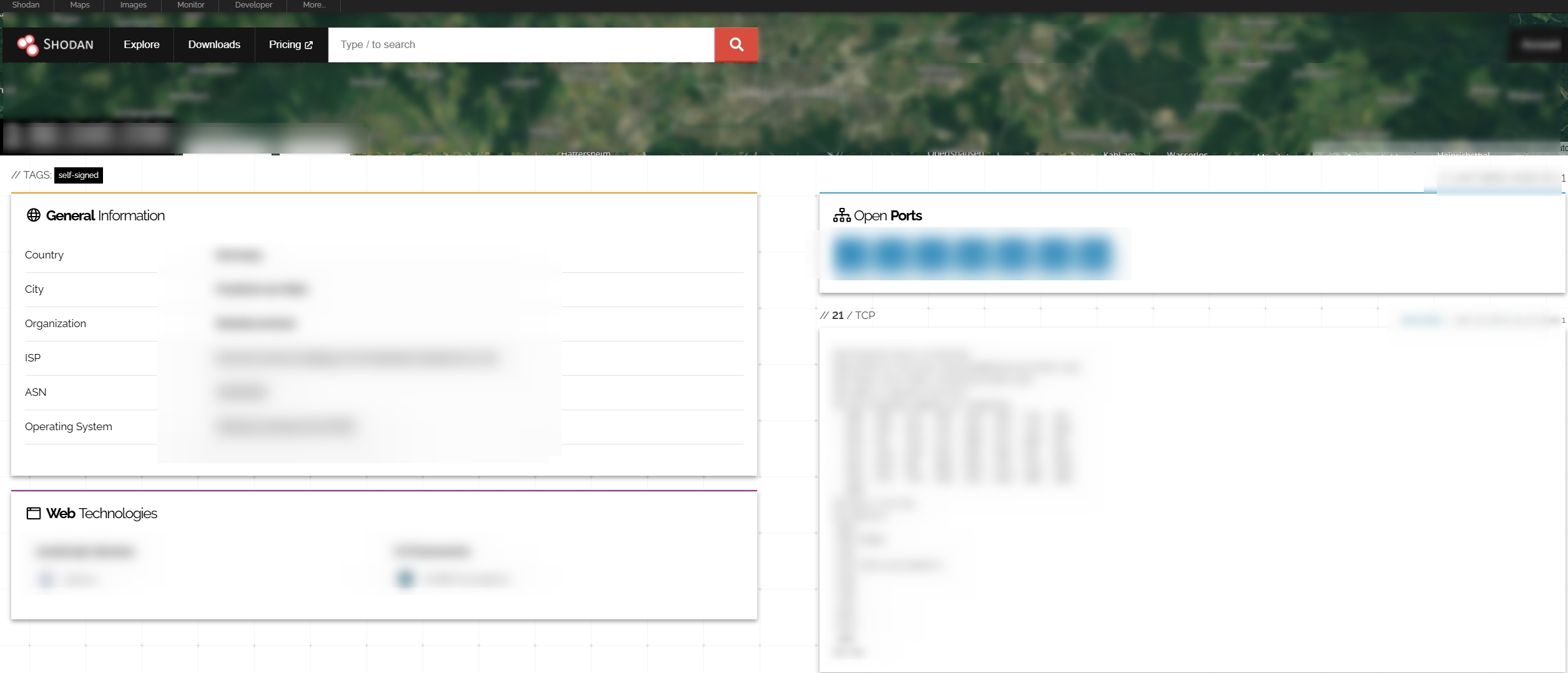
Below is an example of the detailed host information available for a device. This has been redacted for privacy purposes.
An example of available host details, including ISP (Internet Service Provider) & ASN (Autonomous System Number)
## Cost
* [ ] Free
* [x] Partially Free
* [ ] Paid
There are multiple membership plans available for Shodan and there is also a free account option. The free account provides limited results and restricted features but can be used for basic searching.
Full details of the pricing plans and their associated features are available here:
A free membership is available for academics and students:
## Level of difficulty
2
## Requirements
A web browser and email address are required to sign up for an account and use the tool. If you purchase a membership or subscription, a terminal emulator is required to use the Shodan command-line interface.
## Limitations
**Restricted data access:** Free Shodan accounts can view only a limited number of search results and filters. Many advanced functions, such as exporting data, monitoring networks, or using the API extensively, require a paid plan.
**Incomplete coverage:** Shodan does not index all devices on the internet. Its crawlers scan at intervals and may miss or temporarily exclude certain regions, networks, or ports.
**Data freshness:** Search results represent a snapshot in time. Devices may have since gone offline or changed configuration.
**False positives:** Some devices may appear misclassified or linked to erroneous locations due to shared IP ranges, virtual hosting, VPN usage, or proxy services. Manual verification is required before drawing conclusions.
**Limited context:** Shodan provides technical exposure data but not ownership confirmation or intent. Additional corroboration is essential for accurate attribution.
**Data integrity:** Much of Shodan’s information comes from ‘service banners’ returned by internet-facing devices. These banners are controlled by the device owner and may be hidden, modified, outdated, or misleading, so results are not always fully accurate.
## Ethical Considerations
**Respect privacy and minimise harm:** Shodan surfaces information about publicly accessible devices, but that data can still belong to private individuals or organisations. Furthermore, these individuals and organisation may be unaware that this data is publicly available. Investigators should avoid use of potentially unauthorised data unless strictly necessary for public good and avoid sharing identifiable IPs, login screens, or images that could expose personal data or locations. Sensitive details in publications should be redacted accordingly.
**Use data for verification, not intrusion:** Shodan should be used to observe rather than to interact with online systems. Accessing or probing devices beyond what Shodan already provides is unethical and may be unlawful.
**Verify and contextualise findings:** Banner data and screenshots can be misleading or outdated. Always cross-check results with other open sources (WHOIS, DNS, satellite imagery, organisational records) before drawing conclusions or attributing ownership.
**Be transparent about limitations:** When referencing Shodan data in an investigation, clearly note its time of capture and potential for error or partial visibility. Transparency about uncertainty strengthens credibility.
## Guides
The Shodan [Help Center](https://help.shodan.io/) contains essentially all of the information you need to know in order to effectively use the tool. This includes:
* [Search Query Fundamentals](https://help.shodan.io/the-basics/search-query-fundamentals)
* [Navigating the Website](https://help.shodan.io/the-basics/navigating-the-website)
* [API Documentation](https://developer.shodan.io/api)
* [Shodan Credits Explained](https://help.shodan.io/the-basics/credit-types-explained)
## Tool provider
Shodan is privately owned and run by John Matherly (United States)
## Advertising Trackers
* [ ] This tool has not been checked for advertising trackers yet.
* [x] This tool uses tracking cookies. Use with caution.
* [ ] This tool does not appear to use tracking cookies.
| Page Maintainer |
| --------------- |
| Freya |
---
# Agent Instructions
This documentation is published with GitBook. GitBook is the documentation platform designed so that both humans and AI agents can read, navigate, and reason over technical content effectively. Learn more at gitbook.com.
## Querying This Documentation
If you need additional information that is not directly available in this page, you can query the documentation dynamically by asking a question.
Perform an HTTP GET request on the current page URL with the `ask` query parameter, and the optional `goal` query parameter:
```
GET https://bellingcat.gitbook.io/toolkit/more/all-tools/shodan.md?ask=&goal=
```
`ask` is the immediate question: it should be specific, self-contained, and written in natural language.
`goal` is optional and describes the broader end goal you are ultimately trying to accomplish on behalf of the user. GitBook uses it to tailor the answer towards what is most useful for that goal.
The response will contain a direct answer to the question and relevant excerpts and sources from the documentation.
Use this mechanism when the answer is not explicitly present in the current page, you need clarification or additional context, or you want to retrieve related documentation sections.