> For the complete documentation index, see [llms.txt](https://bellingcat.gitbook.io/toolkit/llms.txt). Markdown versions of documentation pages are available by appending `.md` to page URLs; this page is available as [Markdown](https://bellingcat.gitbook.io/toolkit/more/all-tools/leak-lookup.md).
# Leak-Lookup
An online tool that allows you to search across public data breaches to surface credentials that may have been compromised.
## URL
## Description
Leak Lookup is an online tool and database search platform that allows users to check whether their personal information, such as email addresses, usernames, or passwords, has been exposed in data breaches. By entering a query, users can search its database of leaked data to identify if their information has been compromised.
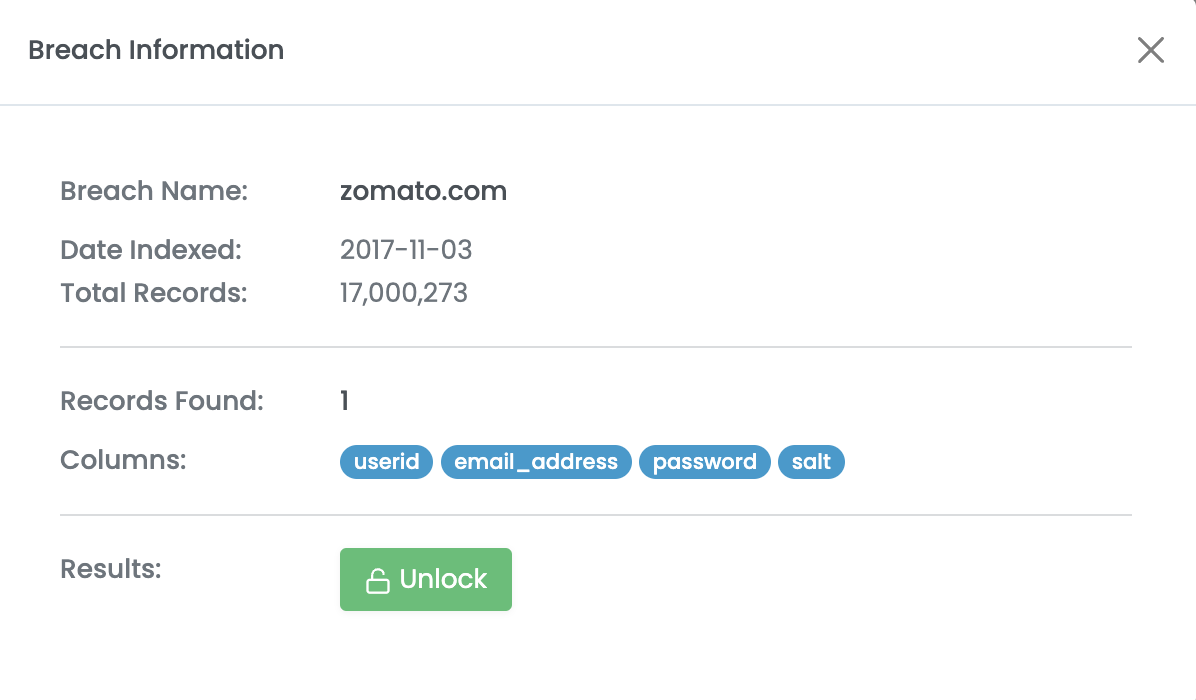
Leak Lookup's collection appears to contain publicly available databases from web applications and services that have been breached, leaked or scraped as well as collections of credentials or personally identifiable information (PII) such as [Collection 1](https://en.wikipedia.org/wiki/Collection_No._1). For each "breach", users are able to see the data types that have been exposed such as email address, username, full name, cleartext or hashed password.
Sample record of breach information
As of June 2026, Leak-Lookup also has the following API offerings:
* [**Search**](https://leak-lookup.com/docs/search)**:** The "search" API is designed to provide a simple and easy to use endpoint for end-users to search across all indexed breaches. Users can search by types of indicators such as email address, username, IP address, phone number, domain etc.
* [**Hash**](https://leak-lookup.com/docs/=hash#requirements)**:** The "hash" API is designed to provide hash-cracking capabilities for end-users, meaning a user can submit a hashed value of a password and the API endpoint will return the cleartext value of the password if the hash has been "cracked." If the hash has been cracked a plain-text value will be returned, if not it will be added to the 'cracking' queue.
* [**Stat**](https://leak-lookup.com/docs/=stats#requirements)**:** The "stats" API is used to retrieve information relating to the current API key, this includes information such as the current request limits, daily request limits etc.
#### Understanding Public/Private API Access Tiers:
* **Leak-Lookup's Public API Tier:** Free of cost, restricted to only returning the site name of the searched query — indexed columns are stripped from the response.
* **Leak-Lookup's Private API Tier**: Priced on a credit/subscription basis oriented towards security teams, businesses, and organizations, subject to overhead charges. Returns all indexed columns for the provided search query.
## How to use it
Leak-Lookup's investigative value stems from the comprehensive, easily accessible collection of data via public and private APIs.
**Step 1 - Log in and begin a search query:**
Create a free account at leak-lookup.com and log in.
**Step 2 - Run a search:**
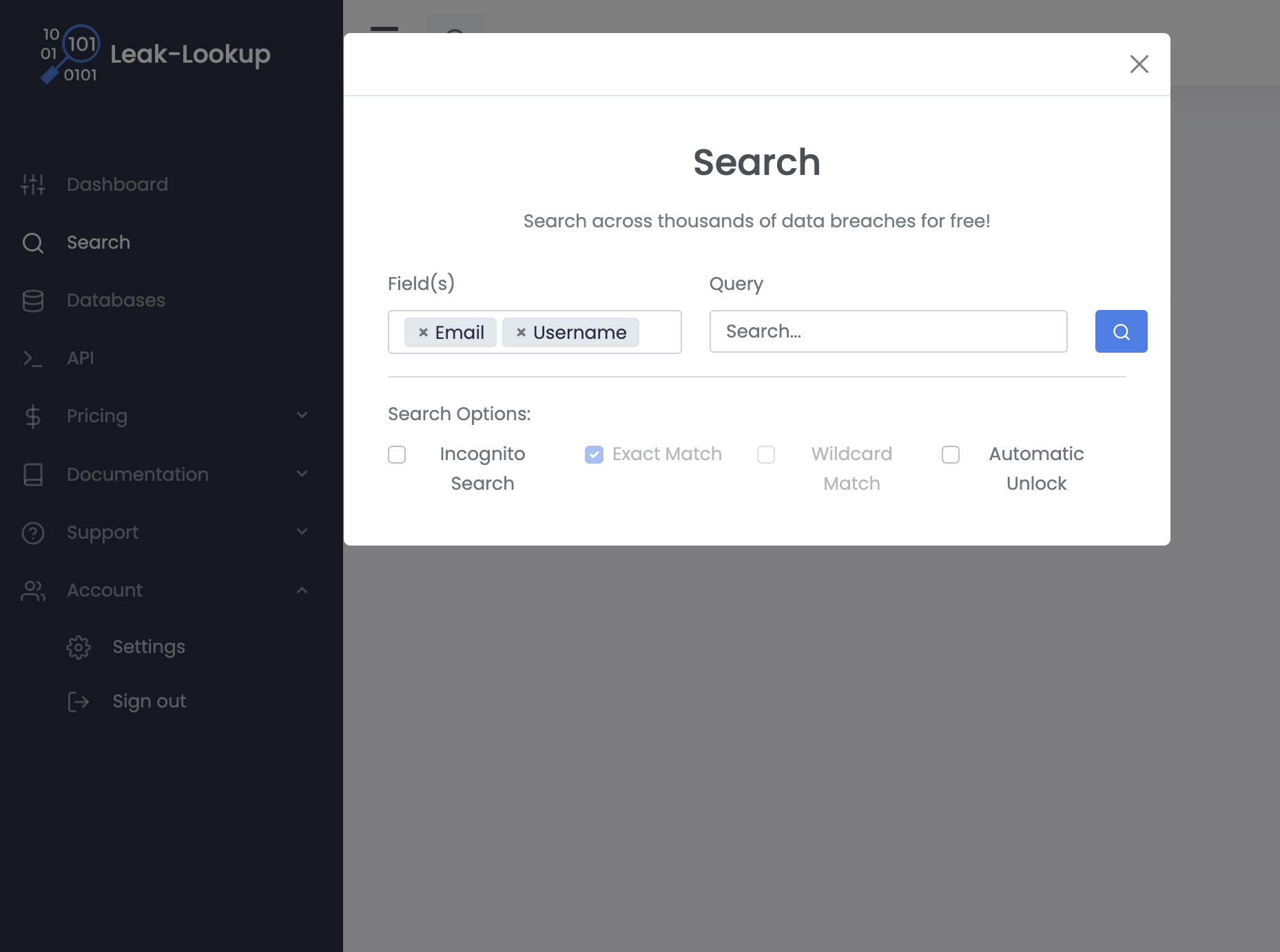
On the dashboard, open the Search panel and select one or more **Field(s)** to search by (Email, Username, IP Address, Phone, Domain, Password), then enter your **Query** and click search. Results list which breaches the identifier appears in and what data types were exposed in each.
Four **Search Options** are available:
* **Exact Match** — checked by default; returns only exact matches to your query. Greyed out; not yet released.
* **Incognito Search** — excludes the query from your search history
* **Wildcard Match** — greyed out; not yet released
* **Automatic Unlock** — requires a paid subscription
Sample search query
## Cost
* [ ] Free
* [x] Partially Free
* [ ] Paid
Up to date [pricing information can be found here](https://leak-lookup.com/packages/credits) after login in with your account.
## Level of difficulty
2
## Requirements
Users must register an account to conduct searches; account registration is free of charge.
## Limitations
A subscription to the service is needed in order to view the full breach details for any given record. Without a subscription, API keys have limitations on how many API calls a user can make — [10 API calls per day](https://leak-lookup.com/packages/api#step-1) per user.
Both public and private API keys offer 5 requests per minute and 10,000 maximum results per search query. However, with purchase of a private API key, a manual export of queries that trigger more than 10,000 results can be completed by contacting the Leak Lookup [support team](https://leak-lookup.com/support/contact).
## Ethical Considerations
Leak-Lookup displays breach details that individuals may access without fully understanding the implications of viewing the data.
1. **Use Without Consent**: Leak-Lookup can be used to search for another person's leaked data without their knowledge or consent. The platform's own [Terms of Service](https://leak-lookup.com/support/terms) state that "...searching for information on others without their consent is strictly prohibited" and the service may only be used for "...your own personal security and research... \[or] information about yourself or those who you are authorized in writing to do so." Despite this stated restriction, the platform does nothing to enforce it, leaving compliance entirely to the user.
2. **Sensitive Data Exposure:** Search results can include plaintext passwords, addresses and other PII— not just confirmation that a breach occurred. This data was never meant to be public, and its exposure through the platform compounds the original breach rather than mitigating it. Leak-Lookup attempts to mitigate abuse by [utilizing](https://leak-lookup.com/support/general) text vectorization and clustering algorithms to monitor for suspicious behavior and anomalies. However, this is a retroactive procedure as API keys are only flagged after suspicious activity for manual review.
3. **Uncertain Provenance:** Leak-Lookup's data comes from various [sources](https://www.threatngsecurity.com/glossary/leaklookup), and the accuracy and completeness of the information can not always be guaranteed. Investigators should treat results as leads to verify rather than confirmed fact.
4. **Platform Legitimacy is Itself Contested:** Leak-Lookup has been the subject of its own scrutiny — it identified as the source of the "[Mother of All Breaches](https://cybernews.com/security/billions-passwords-credentials-leaked-mother-of-all-breaches/)" dataset after over 26 billion exposed records were traced back to the platform. Using a tool whose own data-handling practices are under question carries reputational and ethical weight beyond any single search.
5. **No Accountability for Downstream Harm:** Leak-Lookup [states](https://leak-lookup.com/support/terms) that it is "not responsible for any harm or lawsuit that may derive from using this service", meaning the platform places full liability on the user for how the data is subsequently used, shared, or acted upon.
## Similar Tools
The following tools in the Bellingcat toolkit similarly allow users to check whether sensitive information has been exposed in data breaches:
* [**TruffleHog**](https://bellingcat.gitbook.io/toolkit/more/all-tools/trufflehog) - TruffleHog is a tool that is capable of finding, verifying, and analyzing leaked credentials.
* [**Have I Been Pwned?**](https://bellingcat.gitbook.io/toolkit/more/all-tools/have-i-been-pwned) - Have I Been Pwned (HIBP) allows you to search across multiple data breaches to see if your email address has been compromised.
Leak-Lookup's collection of data appears comprehensive compared to other similar tools such as [HaveIBeenPwned](https://bellingcat.gitbook.io/toolkit/more/all-tools/have-i-been-pwned) (HIBP): as of June 2026, Leak-Lookup [has](https://leak-lookup.com/) approximately 28 million total records from 4,766 breaches while HIBP [has](https://haveibeenpwned.com/) approximately 17 million records from 1,011 websites. It should be noted that despite the larger number of records and "breaches" that Leak-Lookup has, the service appears to count every data field from a breach or leak as one record, while HIBP's record count is based on the number of accounts that have been compromised (which often involves multiple data fields). Additionally, HIBP has a [unique working relationship](https://cisomag.com/have-i-been-pwned-goes-open-source-partners-with-fbi/amp/) with law enforcement entities, specifically the FBI, and security researchers. As such, there have been times when the service was given exclusive access to compromised data by law enforcement partners (including an [ongoing general partnership](https://therecord.media/the-fbi-will-feed-hacked-passwords-directly-into-have-i-been-pwned) with the FBI established in 2021) and security researchers, such as [data from People Data Labs (PDL) ](https://www.troyhunt.com/data-enrichment-people-data-labs-and-another-622m-email-addresses/)which was discovered by researchers Vinny Troia and Bob Diachenko.
While TruffleHog and Leak-Lookup both surface leaked credentials, the comparison ends at vocabulary. Leak-Lookup searches third-party breach dumps that have already been circulated online, returning whether PII appears in known historical breaches. TruffleHog, per its [GitHub](https://github.com/trufflesecurity/trufflehog), is the "most powerful secrets Discovery, Classification, Validation, and Analysis tool." It scans an organization's own Git repositories, chats, wikis, logs, API testing platforms, object stores, and filesystems for leaked secrets instead of parsing historical breach data. It should be noted that the two tools also differ in how they handle confirmation: [Leak-Lookup ](https://leak-lookup.com/support/general)returns whatever has been indexed, while [TruffleHog](https://trufflesecurity.com/blog/scanning-git-for-secrets-the-2024-comprehensive-guide), by default, verifies all leaked secrets it identifies using dynamic requests, eliminating the vast majority of false positives by testing each one against the live provider's API. Additionally, for many credential types, TruffleHog's analysis goes a step further than verification alone: it automatically maps each secret to its associated resources and permissions, telling a user which identity created an exposed key (**identity mapping**), what resources it can access (**resource scope**), and what permissions it holds (**permission assessment**). This is a capability with no equivalent in Leak-Lookup, which surfaces exposure but offers no resource- or permission-level context. As such, the two tools are best understood as solving adjacent but distinct problems: Leak-Lookup helps identify whether a person's identity has already been compromised, while TruffleHog helps an organization determine whether a live, exploitable secret is currently exposed within its own infrastructure.
## Guides and articles
Leak-Lookup has a general support documentation and a FAQ page [here](https://leak-lookup.com/support/general). Status checks of 5-minute interval tests to the Leak-Lookup APIs can be found [here](https://status.leak-lookup.com/).
Leak-Lookup has documentation on API capabilities here: [search](https://leak-lookup.com/docs/search), [hash](https://leak-lookup.com/docs/hash), [stat](https://leak-lookup.com/docs/stats).
## Tool provider
Leak-Lookup, location unknown.
Leak-Lookup can be reached at info(at)leak-lookup.com or on X, the social media platform formerly known as [Twitter](https://x.com/leaklookup).
## Advertising Trackers
* [ ] This tool has not been checked for advertising trackers yet.
* [ ] This tool uses tracking cookies. Use with caution.
* [x] This tool does not appear to use tracking cookies.
| Page maintainer |
| --------------- |
| Lekha Sapers |
---
# Agent Instructions
This documentation is published with GitBook. GitBook is the documentation platform designed so that both humans and AI agents can read, navigate, and reason over technical content effectively. Learn more at gitbook.com.
## Querying This Documentation
If you need additional information that is not directly available in this page, you can query the documentation by asking a question.
Perform an HTTP GET request on the following URL with the `ask` and `goal` query parameters:
```
GET https://bellingcat.gitbook.io/toolkit/more/all-tools/leak-lookup.md?ask=&goal=
```
`ask` is the immediate question: it should be specific, self-contained, and written in natural language.
`goal` is what the user is ultimately trying to achieve, the reason they need the answer. Sharing it helps GitBook give you a better, more relevant answer. A goal is most helpful when it describes the outcome the user wants rather than restating the question. For example, with `ask=how do I create an API token`, a goal like `automate deployments from our CI pipeline` lets GitBook tailor the answer to that use case.
The response will contain a direct answer to the question and relevant excerpts and sources from the documentation.
Use this mechanism when the answer is not explicitly present in the current page, you need clarification or additional context, or you want to retrieve related documentation sections.