> For the complete documentation index, see [llms.txt](https://bellingcat.gitbook.io/toolkit/llms.txt). Markdown versions of documentation pages are available by appending `.md` to page URLs; this page is available as [Markdown](https://bellingcat.gitbook.io/toolkit/more/all-tools/locust-hub.md).

# Locust Hub

## URL

Locust Hub Website: <https://locust-hub-hqfao.hub.arcgis.com/>

Locust Dashboard: <https://www.arcgis.com/apps/dashboards/d8df827fc77340b29740e7b151de1674>

## Description

A public portal managed by the Food and Agriculture Organization [(FAO)](https://www.fao.org/home/en) of the United Nations, the Locust Hub provides information ["about the state of the locust upsurge and the UN's response efforts"](https://locust-hub-hqfao.hub.arcgis.com/). It offers a geographic and time-sensitive visualization of recent desert locust activity, such as hopper groups and bands, adult groups and swarms. It also shows where control operations have been carried out.

According to FAO, the data is "[updated frequently with the latest observations from the field](https://locust-hub-hqfao.hub.arcgis.com/)" by assigned locust teams, supplemented by additional field staff. These reports are then [validated by the country’s national locust centre](https://www.fao.org/locusts/faqs/en/), before being transmitted to FAO’s Desert Locust Information Service which publishes it through the public portal.

<figure><img src="/files/R6XhoyyFSQVokn2w8oZV" alt=""><figcaption><p>A basic 7-day view of desert locust data. Screenshot taken on 20 June 2026.</p></figcaption></figure>

#### How to use the Locust Data Explorer

A more advanced dashboard (accessible [here](https://www.arcgis.com/apps/dashboards/d8df827fc77340b29740e7b151de1674)) provides more detailed information on observations recorded at a given location, including the type of locust presence reported and control operations carried out in the area.

Data can be filtered by time period (last week, this month, last month, last three months), as well as by locust type and by country.

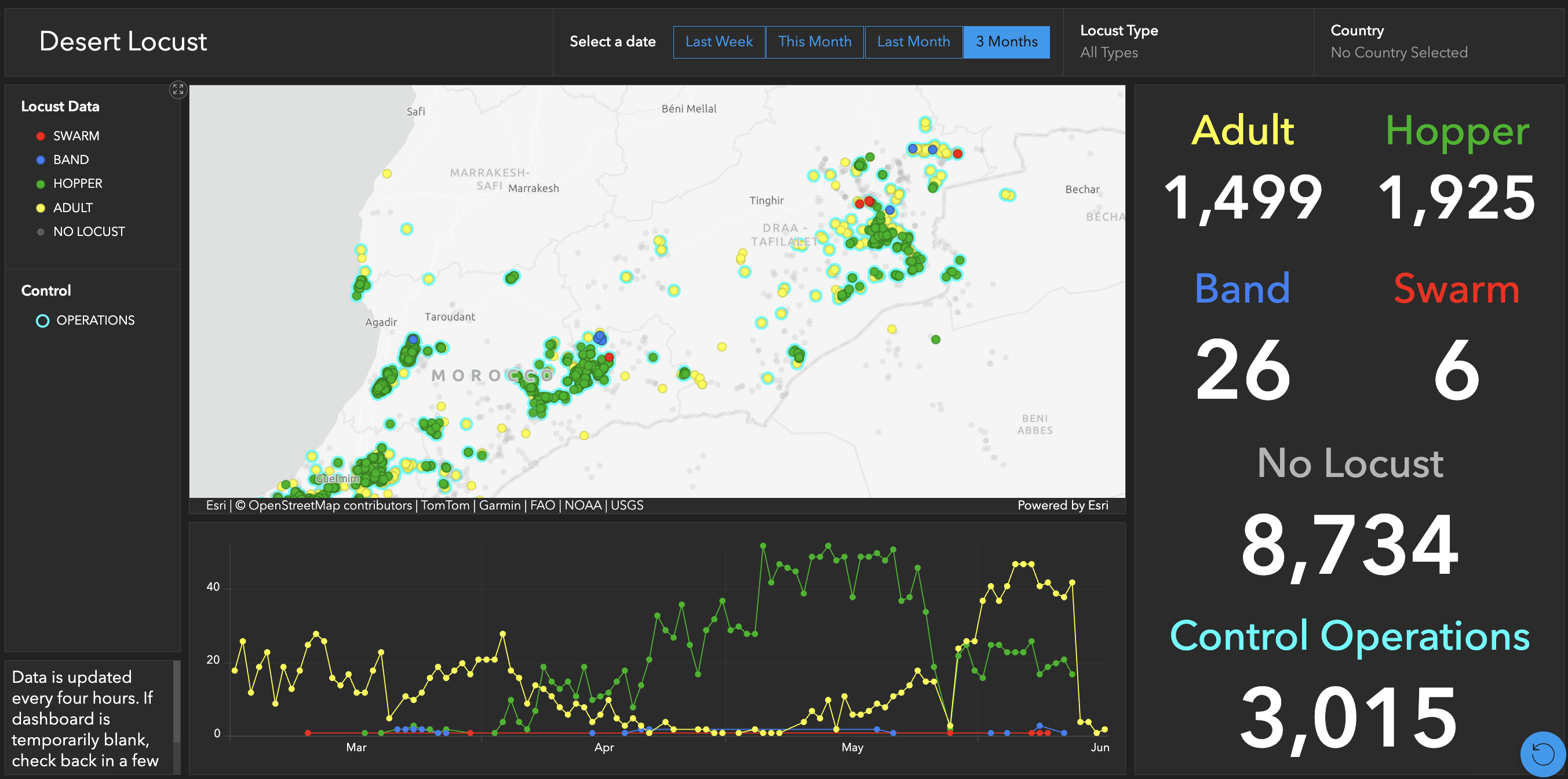
<figure><img src="/files/ogb3GKapk6HVZiYLZjE4" alt=""><figcaption><p>The Locust Hub displaying all reports of desert locusts found during control operations in the last three months.<br>Screenshot taken on 20 June 2026.</p></figcaption></figure>

{% hint style="info" icon="lightbulb-gear" %}
**Green dots** indicate hopper groups (young wingless locusts that can still damage ground-level crops).

**Blue dots** indicate larger groups, or bands, of hoppers.

**Yellow dots** indicate groups of adult locusts.

**Red dots** indicate adult swarms, which can fly long distances and wipe out entire fields within hours.

**Light blue dots** represent where control operations have been carried out.
{% endhint %}

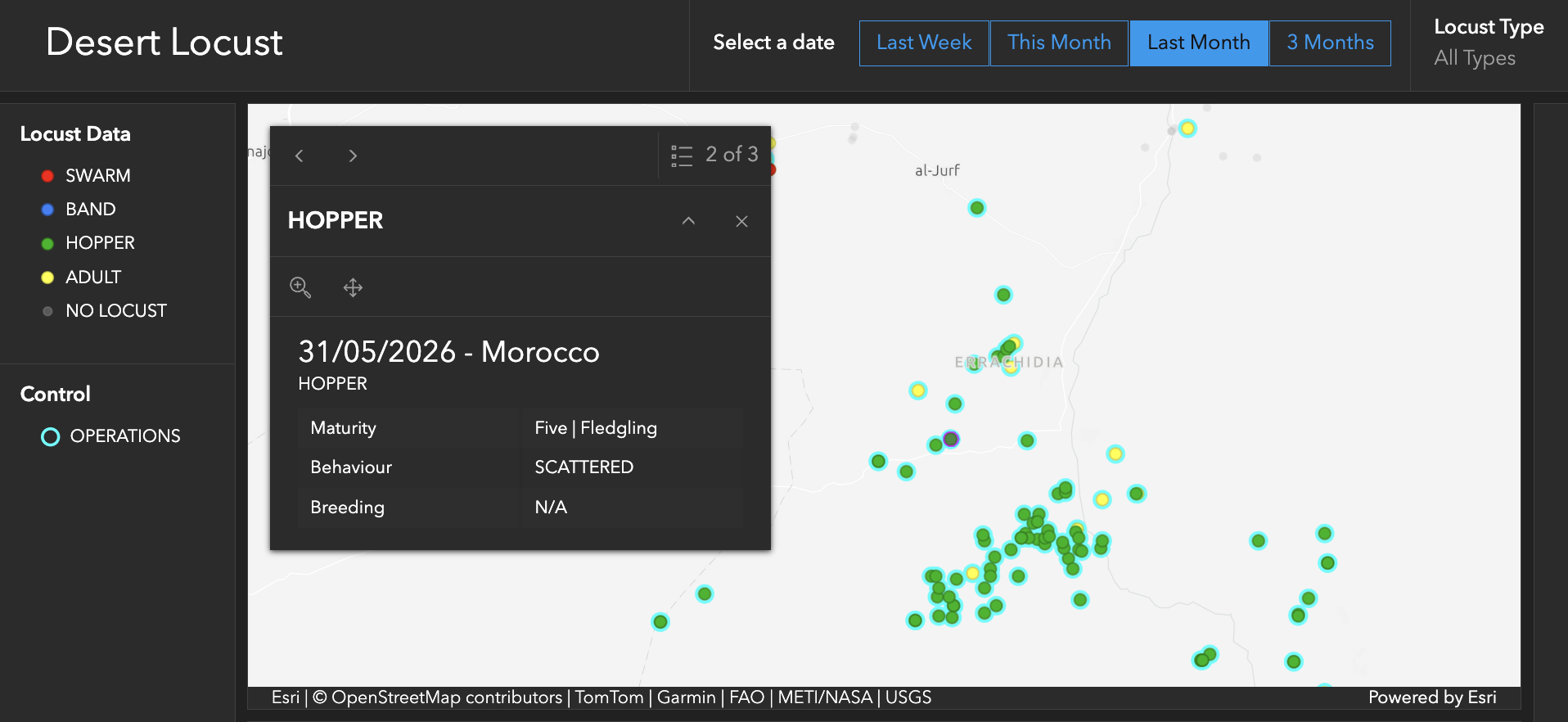
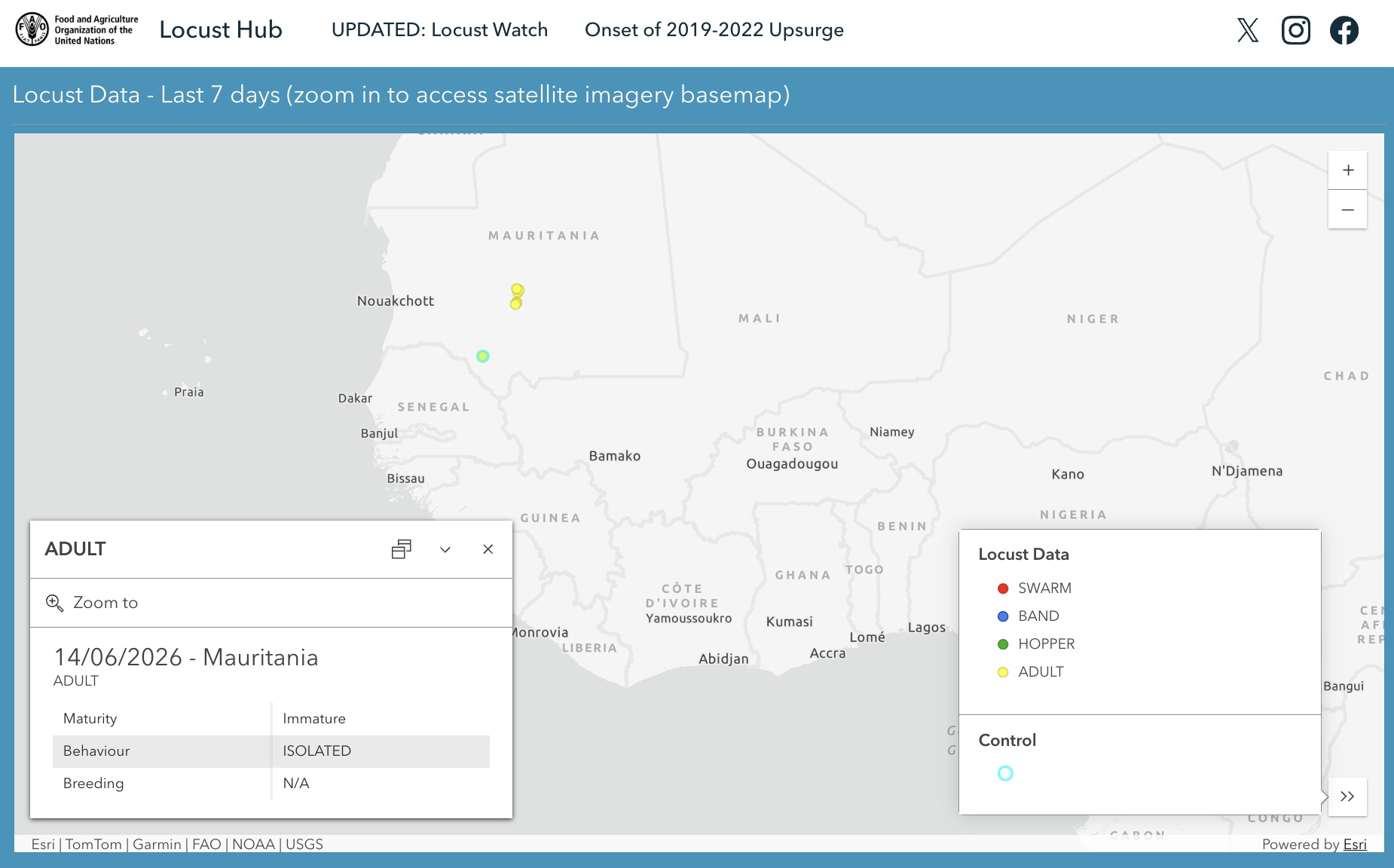
The [locust data explorer](https://www.arcgis.com/apps/dashboards/d8df827fc77340b29740e7b151de1674/) states that it is updated every four hours. Additional information on location, maturity, behaviour and breeding status can be found by clicking on an observation point.

<figure><img src="/files/xcH3tMjw5GzL5MoSBOh3" alt=""><figcaption><p><sub>Location-specific data on maturity, behaviour and breeding status if known. Screenshot taken on 23 June 2026.</sub></p></figcaption></figure>

The data can also be used to predict movement of swarms, when used in conjunction with tools such as [windfinder.com](https://www.windfinder.com/) (which offers a map of wind speeds in the region), or [soil moisture viewer](https://locust-hub-hqfao.hub.arcgis.com/pages/lobelia-viewer) as locusts thrive after heavy periods of rainfall.

#### How to use the Soil Moisture Viewer

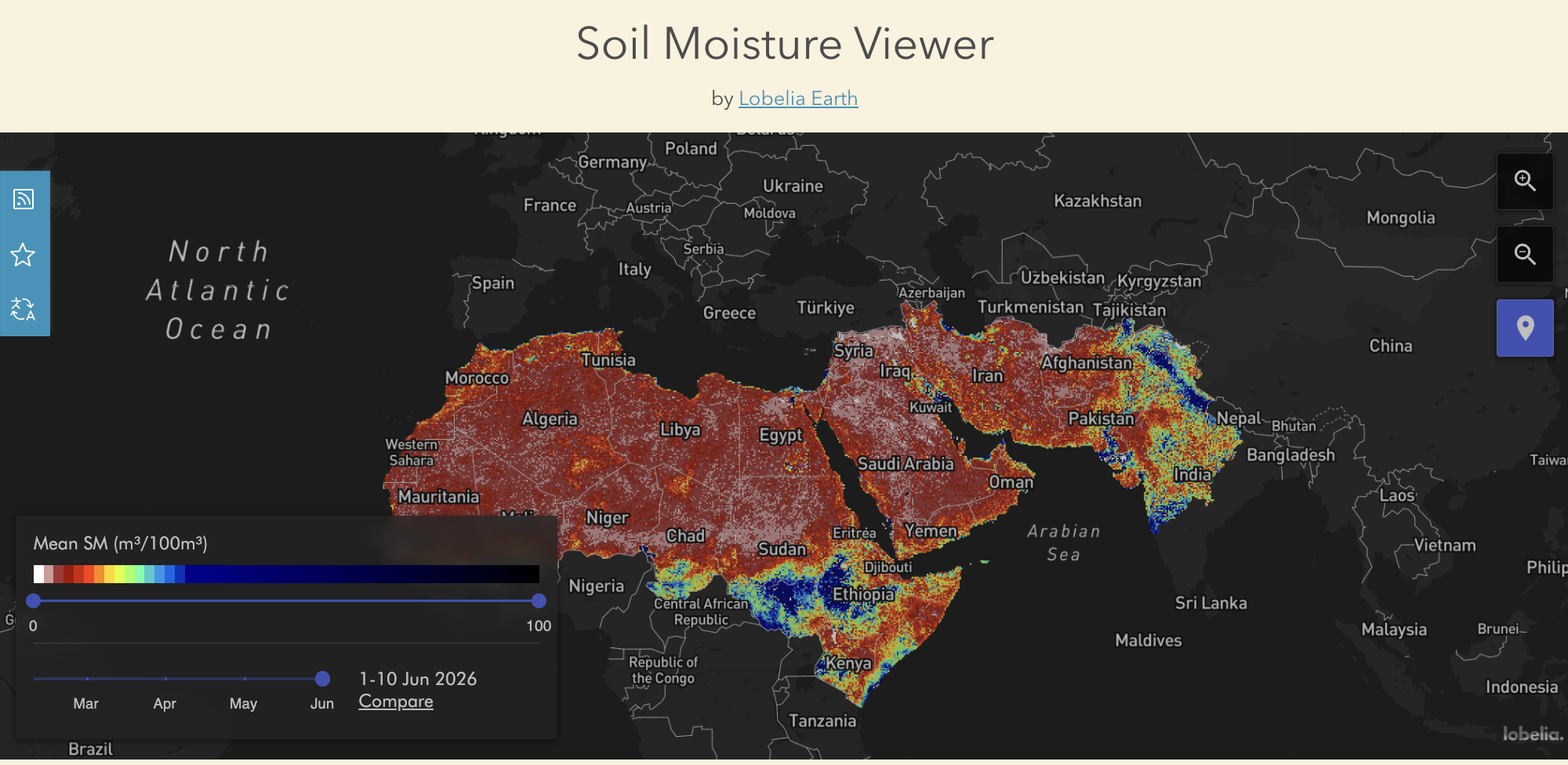
This tool (accessible [here](https://locust-hub-hqfao.hub.arcgis.com/pages/lobelia-viewer)) provides soil moisture data at 1 km resolution across desert locust breeding areas. Developed for FAO's global Desert Locust early warning system, it can help identify moist sandy soil areas favourable to locust reproduction in Africa, the Near East and southwest Asia.

According to [FAO](https://locust-hub-hqfao.hub.arcgis.com/pages/lobelia-viewer), the service is updated every ten days and allows users to explore changes in soil moisture over the previous three months.

<figure><img src="/files/myI0XUnIZ6Cl77ssCJdS" alt=""><figcaption><p>A generic view of the Soil Moisture Viewer. Screenshot taken on 20 June 2026.</p></figcaption></figure>

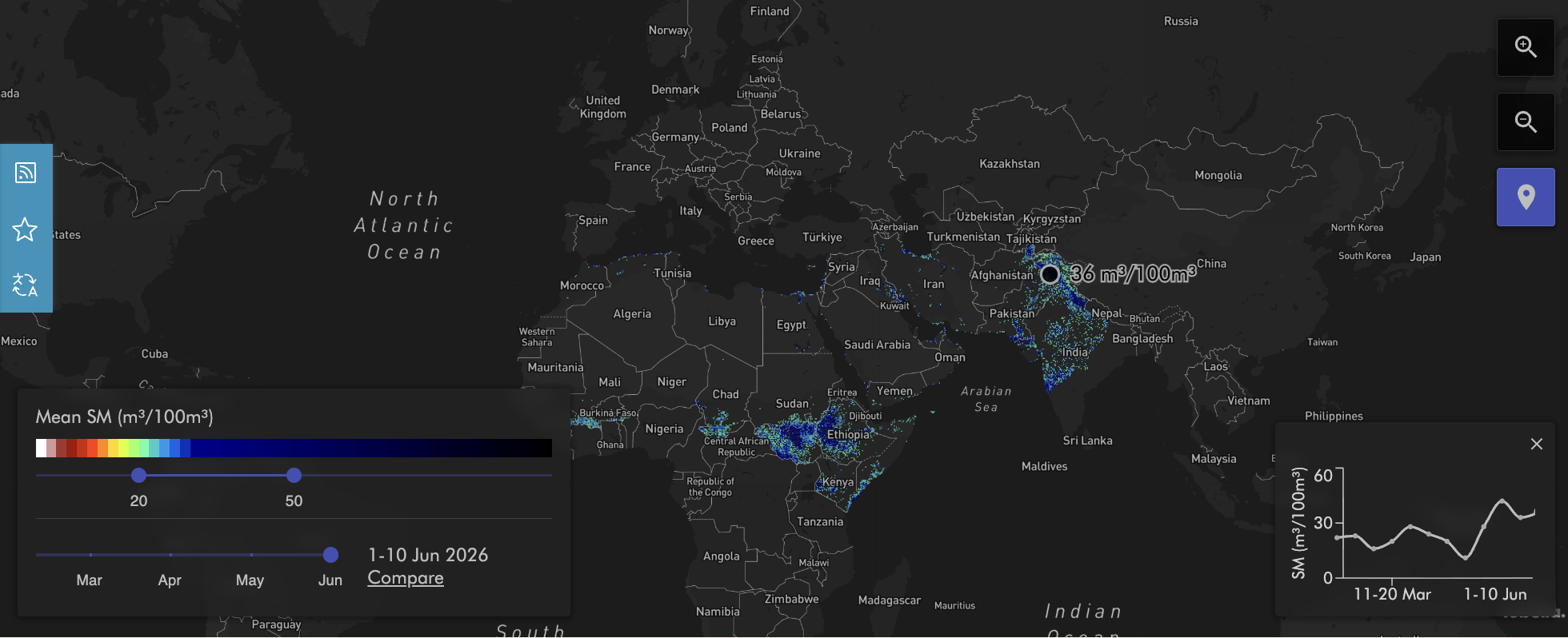
Slider buttons allow users to adjust the mean soil moisture range shown on the map during a specific 10-day period.

Clicking on a location displays the mean soil moisture over the selected period, and opens a small chart in the interface showing earlier measurements in that same place.

<figure><img src="/files/ZJehP2fZZX4KPP3RkYgS" alt=""><figcaption><p>The Soil Moisture Viewer showing all areas with a mean soil moisture of 20-50 m<sup>3</sup>/100m<sup>3</sup> at the beginning of June 2026.<br>Screenshot taken on 23 June 2026.</p></figcaption></figure>

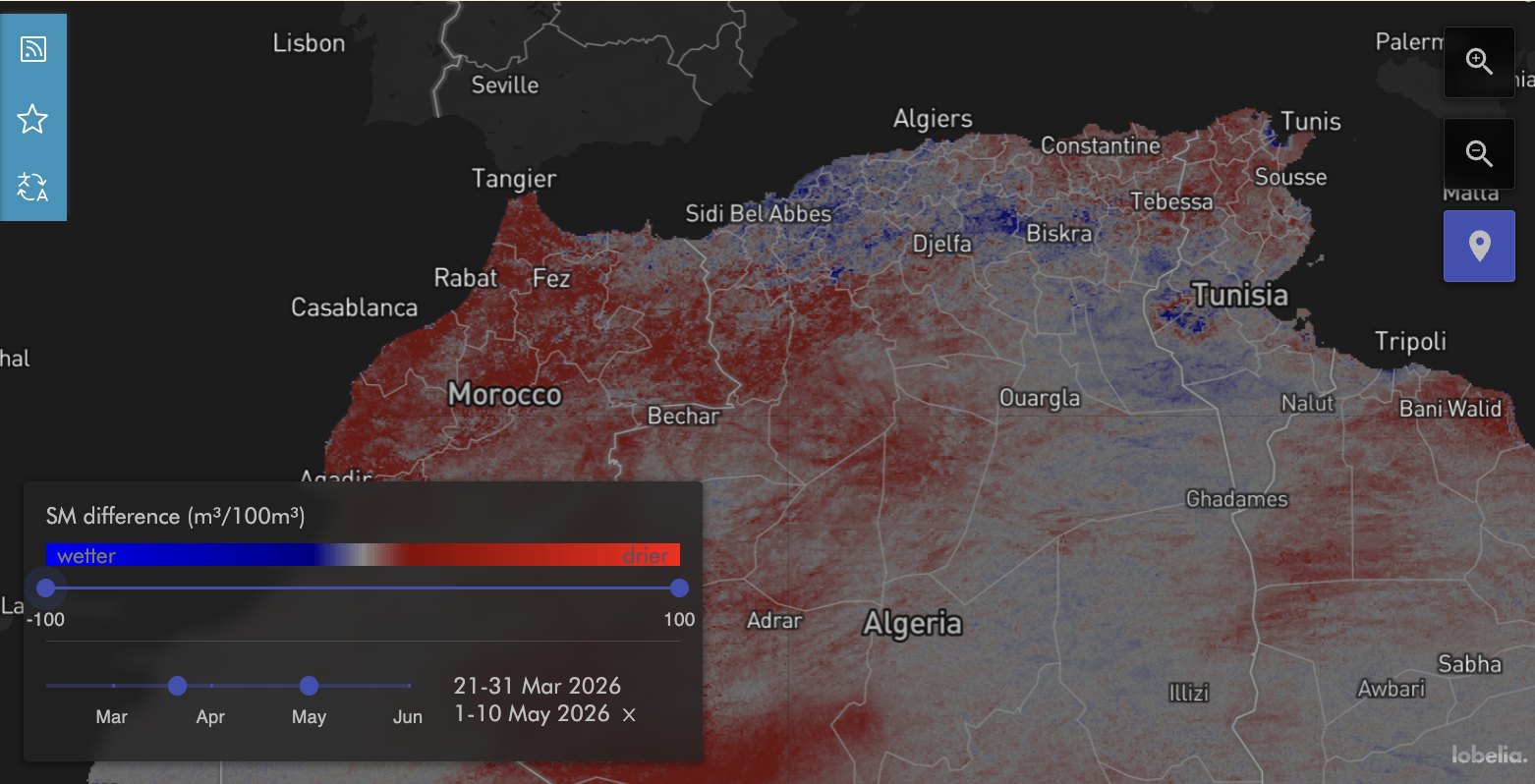
The “Compare” function offers a comparison of soil moisture levels between two selected time periods. This indicates whether the soil is drier (in red) or wetter (in blue) than during the chosen reference time period.

<figure><img src="/files/hx2JcYaaUq6a6aCNvNEn" alt=""><figcaption><p>Soil moisture difference in North Africa between 21-31 March and 1-10 May 2026. Screenshot taken on 20 June 2026.</p></figcaption></figure>

## Cost

* [x] Free
* [ ] Partially Free
* [ ] Paid

## Level of difficulty

<table><thead><tr><th data-type="rating" data-max="5"></th></tr></thead><tbody><tr><td>2</td></tr></tbody></table>

## Requirements

Users will need to submit this [online form](https://docs.google.com/forms/d/e/1FAIpQLSeagLDm9KkPYVe2fiJ7mmU0Zs6f98lIBAXRGqgrjMEPhOPxAg/viewform) and create a [FAO Data in Emergency Community ](https://hqfao.maps.arcgis.com/sharing/oauth2/signup?oauth_state=ag8BfOHP4NbKhIToav6RUSQ..q9CeqT6GCT0imEsisBKnMyLVmTGYfuLyuYZmbENjAHBMLovUvi2_OWGPRABHAYoX2S5z30r508VMWI0l24Y40WCx45QNS99pqbIHLbD09XVEIKrngTOZFuMK-Dv1SbYzkGQwWf3TNB-yIIPrXPkBzVC1fPfTjtrGJJyIjHLjfbFxd3vpF6MAoBhNVFeLKr_0WGzcWEcjRSX1rYJlit19McM79mmF5RWYeOayhW-hbCeGacufop8fICiadjCiQU13bbWNLLMSgG-EQ89Fbk6LkPJem4du0Irk9jSYdcDPZDSTaFOjcaRB0fmFXGl_Rgrytnv70ZnJOOZPKfoxXHoHX3Au3mMxBZtLCpaYzjKgKFfBn29RFZRDMq89R5YW2IVpDa1nUvCAF9wKbv-cBpqkfm9i0fUFXYAqQZ0.)account to have access to the full historical archives dataset. The data provided are "archival" data, from 1965 to last year.

The website states that with that option, "real-time data are not available but can be seen through the [Locust-Hub data explorer.](https://locust-hub-hqfao.hub.arcgis.com/)"

Users can also use an ArcGIS login if this is already provided by their institution.

## Limitations

The hub is mostly descriptive (i.e., past and current sightings). The data quality will vary per country as it depends on inputs by local teams.

Some familiarity with GIS tools will be required for non-specialists.

Although the data is regularly updated, it may not always be updated in time for research on the real-time status or for making predictions.

## Ethical Considerations

If using Locust Hub data with personally identifiable or politically sensitive datasets, it is advisable to avoid unintentionally exposing individuals or communities to risk. Data should be contextualized, anonymized where necessary, and presented with transparency about its limitations and sources.

## Guides and articles

Edward Tian on [How To Track Desert Locust Swarms](https://www.bellingcat.com/resources/how-tos/2020/06/23/how-to-track-desert-locust-swarms/), Bellingcat.

## Tool provider

Managed by the [Food and Agriculture Organization (FAO) of the United Nations](https://www.fao.org/home/en) headquartered in Rome, Italy.

## Similar tools

Tools similar to Locust Hub:

[eLocust3m](https://apps.apple.com/th/app/fao-elocust3m/id1673483386): This is a smartphone app developed by FAO in collaboration with PlantVillage / Penn State, designed for field teams to [report locusts.](https://www.youtube.com/watch?v=UJvnOLXFdow) It also has a function that allows app users to report sightings.

[eLocust3](https://www.fao.org/locust-watch/activities/dlis-home): This includes a field survey device with tablet and satellite antenna used by national survey/control teams, especially in remote areas where connectivity is poor. It includes features like mapping, navigation, recording of infestation polygons (via GPS) and data transmission via satellite so that even remote survey teams can send data.

[EarthRanger](https://www.earthranger.com/success-stories/fao): Developed for wildlife management, EarthRanger has been enhanced to ensure ingestion of eLocust3m and eLocust3g data as well as exporting manually entered data in a compatible format for inclusion in the [RAMSES GIS](https://www.fao.org/locust-watch/activities/innovation/gis/en) used by national locust authorities. It is used to manage survey and control aircraft / assets, track spray operations, visualize maps of where swarms and control interventions are happening.

For predictive modelling, Locust Hub is best used in conjunction with other tools such as:

Windspeed: <https://www.windfinder.com/>

Weather and Rainfall data offered by [Nasa Worldview](https://bellingcat.gitbook.io/toolkit/more/all-tools/nasa-worldview).

## Advertising Trackers

* [x] This tool has not been checked for advertising trackers yet.
* [ ] This tool uses tracking cookies. Use with caution.
* [ ] This tool does not appear to use tracking cookies.

| Page maintainer           |
| ------------------------- |
| Bellingcat Volunteer Team |
|                           |


---

# Agent Instructions
This documentation is published with GitBook. GitBook is the documentation platform designed so that both humans and AI agents can read, navigate, and reason over technical content effectively. Learn more at gitbook.com.

## Querying This Documentation
If you need additional information that is not directly available in this page, you can query the documentation dynamically by asking a question.

Perform an HTTP GET request on the current page URL with the `ask` query parameter, and the optional `goal` query parameter:

```
GET https://bellingcat.gitbook.io/toolkit/more/all-tools/locust-hub.md?ask=<question>&goal=<endgoal>
```

`ask` is the immediate question: it should be specific, self-contained, and written in natural language.
`goal` is optional and describes the broader end goal you are ultimately trying to accomplish on behalf of the user. GitBook uses it to tailor the answer towards what is most useful for that goal.

The response will contain a direct answer to the question and relevant excerpts and sources from the documentation.

Use this mechanism when the answer is not explicitly present in the current page, you need clarification or additional context, or you want to retrieve related documentation sections.